BodySlide and Outfit Studio v6.2.0
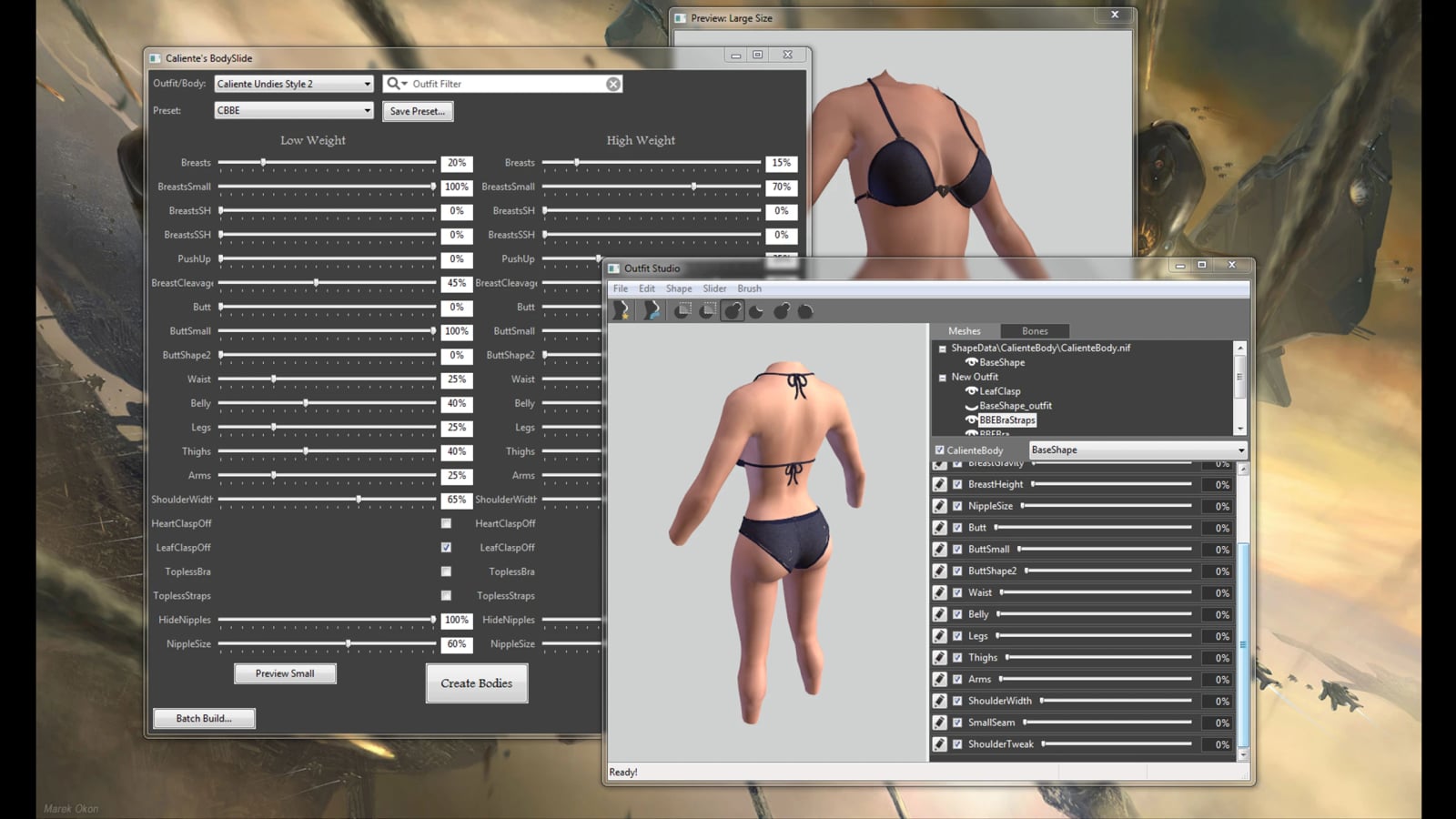
An easy-to-use tool for customizing bodies and outfits, creating new bodies and outfits, and converting outfits between body types.
Available for: Skyrim LE, Skyrim SE, Fallout 4, Starfield
Features
- Customize outfits and bodies without editing mesh files.
- Use sliders to create personal shapes.
- Improved user interface.
- Filter outfits and preview textured results.
- Build morph files to use sliders in-game with RaceMenu or other script mods.
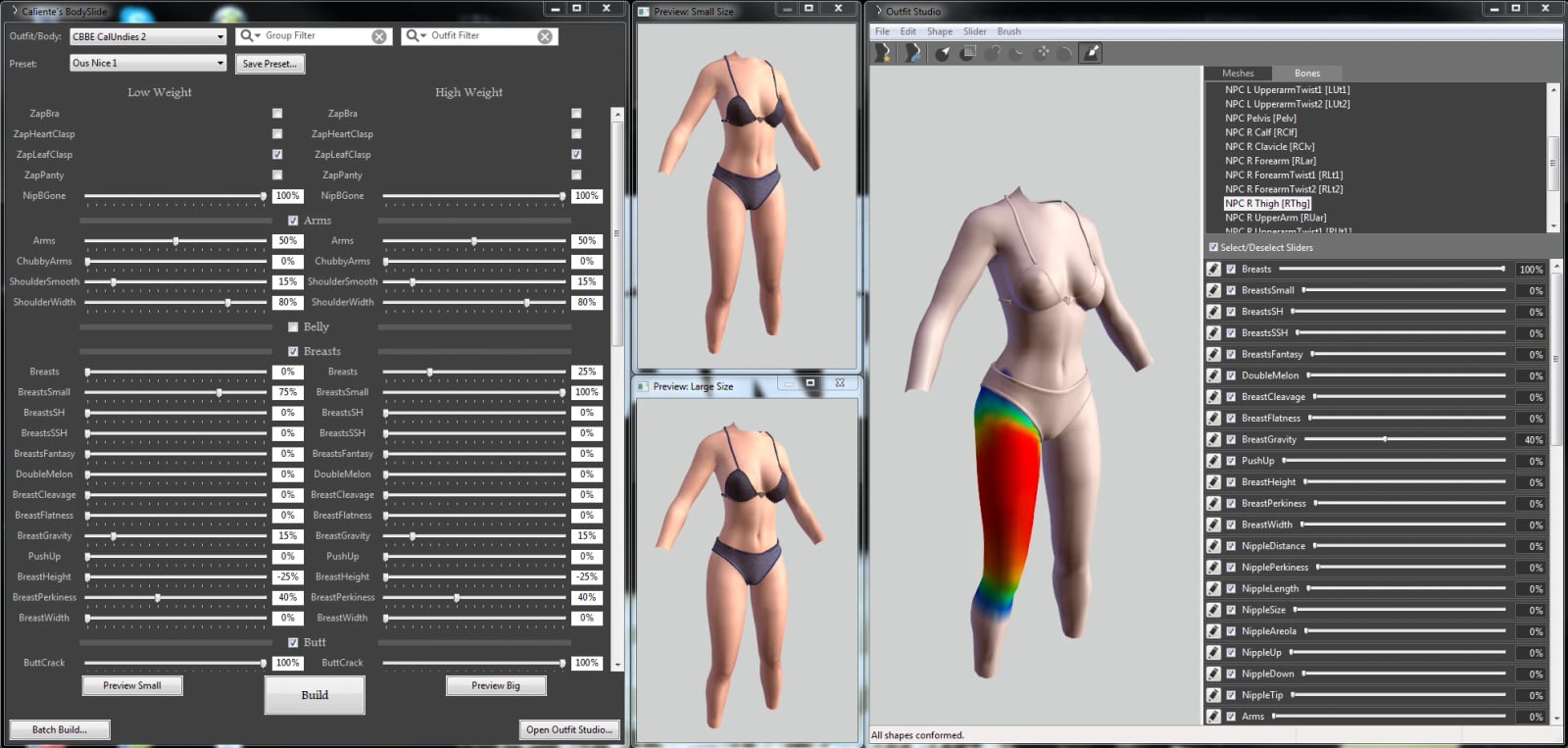
- Convert outfits between bodies, create BodySlide sliders, correct animation weights, and edit meshes.
- Edit static meshes.
- Import and export
.FBX,.OBJ, and.NIFmeshes.
CBBE Body
- The Caliente Body with additional flexibility.
- The 50+ sliders are divided into categories that can be toggled on or off.
- Requires CBBE and includes BBP, TBBP, and HDT variants.
Unified UNP
- UNP shape variants combined in one set of sliders.
- Includes all of the sliders that CBBE BodySlide has, plus full-body sliders for the most popular UNP family shapes.
- These bodies require UNP textures and come in regular, HDT, and Special variants.
- UUNP Special has a “working” 3D vagina for the HDT Physics Extensions and requires the included TexBlendUUNP package.
- Unless necessary, conversions should be made for UUNP regular and UUNP HDT only.
RaceMenu Morphs
- Use BodySlide sliders in-game with the RaceMenu mod.
- Build bodies and outfits in BodySlide with the “Build Morphs” check box enabled to tweak them further in-game.
- Manual tweaking works for the player character and EFF followers only.
Specifications
- Supported games: Skyrim LE, Skyrim SE, Fallout 4, Starfield
- CBBE Body: 50+ sliders
- RaceMenu Morphs require RaceMenu v3.4 or higher.
- UUNP variants: regular, HDT, and Special
- Physics variants: BBP, TBBP, and HDT
Requirements
- CBBE is required for the CBBE Body.
- UUNP bodies require UNP textures.
- RaceMenu Morphs require RaceMenu v3.4 or higher.
- For body physics, install a compatible skeleton mod. XPMSE by Groovtama works for all types of physics systems and more.
- XPMSE is the reference skeleton of Outfit Studio and is used for adding the bones required for physics to work.
- Any Outfit Studio reference skeleton fixes are not needed anymore and should not be installed.
- Unified UNP does not support BBP and TBBP anymore.
Installation
Manual
- Download the file and extract the options you want into your Data folder using 7-zip.
- Make sure the structure is correct:
Data -> CalienteTools -> BodySlide.
Nexus Mod Manager
- Install the archive to Nexus Mod Manager as with any other mod and enable it.
- Under the “Supported Tools” drop-down at the top of NMM, configure or launch BodySlide and always run it from there.
- If NMM did not find the BodySlide folder automatically, select the BodySlide folder within your game’s Steam folder yourself by right-clicking.
- Do not select the virtual install BodySlide folder of NMM. Select the one in the real game folder of Steam.
- Install any BodySlide addons to NMM as well.
Vortex
- Download and install the archive to Vortex as with any other mod and enable it.
- In the dashboard, go to “Add Tool”.
- In the “Target” field, choose the BodySlide executable from your game’s real data folder, the
Data/CalienteTools/BodySlidefolder. - Install any BodySlide addons to Vortex as well.
Mod Organizer
- Download and install the archive to MO as with any other mod and enable it.
- Add a shortcut to the BodySlide executable and set it to run from your game’s real data folder.
- Install any BodySlide addons to MO as well.
Updating
You can uninstall the old version and install the new one, or install the new files and overwrite them if prompted. Back up your personal presets, groups, bodies, and outfits in the SliderSets, SliderPresets, ShapeData, and SliderGroups folders so they are not deleted, whether by accident or by a buggy mod manager.
Addons
For CBBE:
- Caliente’s Vanilla Outfits
- BodySlide Outfits and Mods
- Remodeled Armor by ChronoTrigger77
- Individual outfits on their mod pages
- More in the CBBE mod list.
For UUNP:
- Remodeled Armor by gamefever, ousnius, and ChronoTrigger77
- MiniDresses Collection by tiwa44, converted by gamefever
- Individual outfits on their mod pages
Mods:
- WeightMorphs by ousnius
Compatibility
- BodySlide works with any body or outfit. Conversion between body types requires conversion slider sets.
- CBBE and UUNP slider sets can often produce the same body shape without conversion.
- Each physics type has a different combination of bones or animation weighting.
- A compatible skeleton mod is required for physics meshes to avoid crashes.
FAQ
Q: If I have an issue, what should I do before anything else, including posting questions?
A: Read the mod description, especially the FAQ. Read the stickies. Reinstall BodySlide. Install BodySlide manually if your mod manager fails to do its main purpose.
Q1: Does this work with [insert body type here], or is it just CBBE?
A: It works with any body or outfit. However, conversion between body types requires conversion slider sets.
Using the CBBE or UUNP slider sets in BodySlide, you can often get the same body shape without converting anything.
Q2: I created a nude body, but when I batch-built the outfits, everyone suddenly has underwear. How do I fix it?
A: When you batch-build, select only what you actually want. If you do not want an underwear body to overwrite your nude one, do not select it. Use the BodySlide group filter by clicking the magnifying glass at the top.
Q3: Is there a conversion set for [Body A] to [Body B]?
A: Since each body is different, each pair of body types requires its own conversion slider. Several conversion sets have already been made, but not all possible body types have been addressed. Creating a conversion set is fairly easy and, in many cases, does not require mesh editing. Look for tutorials on this topic for more information.
Q4: Why is CBBE used in all the bundled conversion sets?
A: The flexibility of the CBBE body and its large number of customization sliders make it possible to match most body shapes without mesh editing. Small adjustments can be made quickly in Outfit Studio.
CBBE is also used as a bridge. Creating a “Body->CBBE” conversion automatically allows a “CBBE->Other Body” slider that has already been created to be used, saving time. For these reasons, CBBE is recommended as a bridge for new conversion sets, but there is no technical reason why any body mesh cannot be used in the conversion set.
Troubleshooting
Q1: BodySlide fails to create the bodies I make. How can I get the meshes installed?
A: Make your changes to the sliders, then CTRL+Click the ‘Build’ button. The femalebody_0.nif and femalebody_1.nif will then appear in the BodySlide folder. Copy these to your Skyrim/Data/meshes/actors/character/character assets directory and allow any overwrites. You may also need to copy them elsewhere if you use a standalone race or follower mod, so consult that mod’s description or readme.
Q2: NifSkope does not show my exported meshes. How do I fix this?
A: Sometimes Outfit Studio does not apply weights to some vertices because they are too far off from the reference shape. It should warn you when attempting to save a project or export a mesh.
Use the “Mask Weighted Vertices” feature and the weight brush to paint weights on the unmasked parts. NifSkope should then show the .nif again, and the unweighted vertices should appear in-game.
Q3: The meshes in my preview windows have a black or grey mask saying “no image”. How do I make the right textures appear?
A: Install the outfit and body textures in your Data directory. Launch Skyrim from the default or Steam launcher to sort out the registry, or manually set the directory to point to Skyrim/Data with the ‘Settings’ button. Only then can BodySlide and Outfit Studio find and load the textures.
Q4: The RaceMenu Morphs do not work. What should I do?
A: Make sure you have SKSE 1.7.3+, RaceMenu 3.4+, and are checking the box in BodySlide when you build a body. You need to use BodySlide to get it working.
Q5: Why do gaps appear in the body after using the RaceMenu morphs?
A: This is an issue with NiOverride or RaceMenu. The only known workaround is to install the HDT Physics Extensions, even if you do not use any type of physics.
Q6: Why does my game crash every time I touch a morph slider in RaceMenu?
A: This is often related to the “Crash Fixes” mod. Check your CrashFixPlugin.ini file. If the UseOSAllocators=1 option is enabled, also enable the AlignHeapAllocate=1 option to prevent the crash when morphing.
Q7: Why do I get an error saying “Failed to find game install” or “Failed to load Setup.xrc file.”?
A: The registry is not set, or BodySlide was not installed properly. Launch Skyrim using the Steam launcher instead of SKSE to fix the registry, then try launching BodySlide again. If it still does not work, make sure all files are installed correctly and run it as administrator. Ensure the directory is Skyrim/Data when you click on ‘Settings’. Try downloading and installing the mod with all antivirus software disabled and/or manually. If you are using NMM, make sure you are using the latest files from GitHub.
Q8: Why does the FBX import create weird texture coordinates?
A: Split all edges of your mesh along the UV seams. The NIF format only supports one texture coordinate per vertex, so UV seams need duplicated vertices.
Q9: Why do I get an error saying “OpenGL context is not OK” for Outfit Studio or the preview window?
A: The graphics chip driver does not support the required version of OpenGL. Update all graphics drivers manually. If there are multiple graphics chips built into your PC, set BodySlide to run with the dedicated one only. If your card does not support OpenGL 3.3, upgrade to a newer card or do not update BodySlide.
Q10: Why does the program crash when I load a body into the preview window or Outfit Studio?
A: There are many possible reasons, but one known solution is updating your “Mature Skin” or “Fair Skin” body texture mods to their respective latest versions.
Q11: How can I make older Chinese mods work properly with newer versions of BodySlide?
A: Convert the .osp files of older Chinese mods to UTF-8 encoding.
Q12: There is scary red shiny gold text at the bottom of BodySlide. What should I do?
A: This was added in BodySlide v.5.5.0. The red gold colour means you have more than one option in BodySlide for the same thing. Right-click it to see these options. Clicking one switches to it in the Outfit/Body drop-down menu. If you check the box next to the red gold text, it turns blue. BodySlide will then build this mesh only when you BatchBuild, reducing the number of options you have to select when BatchBuilding.
Uninstalling
Delete the BodySlide folder you originally extracted, or remove it using NMM or MO. Back up any presets or edited files made with Outfit Studio. Mod managers should leave such files alone.
To remove outfit files created with BodySlide, delete the appropriate meshes within the Data/meshes directory. Only you know which files those might be.