AutoBackport-Enhanced – OnePluginBeta v1
DESCRIPTION
Auto-Backport converts Skyrim Special Edition mods back to Skyrim Legendary Edition — plugin format, meshes, textures, animations and BSA archives — entirely on its own, with no external tool required.
This Enhanced build adds the feature the previous version was missing, and the one that decides whether a modern mod is portable at all:
it merges the mod’s plugins together, so a mod that shipped 192 ESPs no longer eats 192 of your load order slots.
Why this matters: Legendary Edition has no ESL. Every single plugin costs one of your ~255 slots. A modern SE patch collection can ship dozens — sometimes hundreds — of tiny ESPs. Converted one-for-one, such a mod is simply not usable in LE, no matter how perfect the conversion is. Merging is what makes it usable.
WHAT’S NEW COMPARED TO THE PREVIOUS VERSION
Previous version: AutoBackportSeToLE
– NEW — Plugin merging
Before: every ESP came out as a separate ESP. A 192-plugin mod stayed a 192-plugin mod.
Now: the tool works out which plugins can be merged with no downside at all, shows you the proposal before you convert, and merges the ones you tick.
– NEW — Grey faces & silent dialogue fixed
Before: on some mods, NPCs came out with dark/grey faces and their voiced lines were silent — while the plugin itself looked perfectly valid in xEdit.
Now: fixed at the root. Face and voice files are re-indexed whenever a record’s ID changes, so the game finds them again.
This one affects every conversion, merging or not.
– NEW — Conversion is now parallel, and much faster
Before: meshes and textures were converted one file at a time, on a single core. A large worldspace mod took several minutes.
Now: both passes run across all your CPU cores. A mod with roughly 5 800 meshes and 7 400 textures converts in about 90 seconds.
– NEW — SkyPatcher support rewritten against the framework’s real source code
SkyPatcher is a 64-bit SKSE plugin: it cannot exist in LE. Everything it did at runtime has to be baked into the plugin instead — so getting it right is not optional.
Before: the parser depended on the order of the keys in a line and silently dropped entire directives, and NPC filtering combined every filter with AND when the real engine does something quite different.
Now: audited line by line against SkyPatcher’s actual source. Keys are read in any order, NPC selection matches the engine (named NPCs are always patched; attribute categories are ORed; exclusions stay hard guards), and coverage was extended to outfits, leveled lists, crafting recipes, and keyword add/remove on twelve item families.
– NEW — Redesigned interface
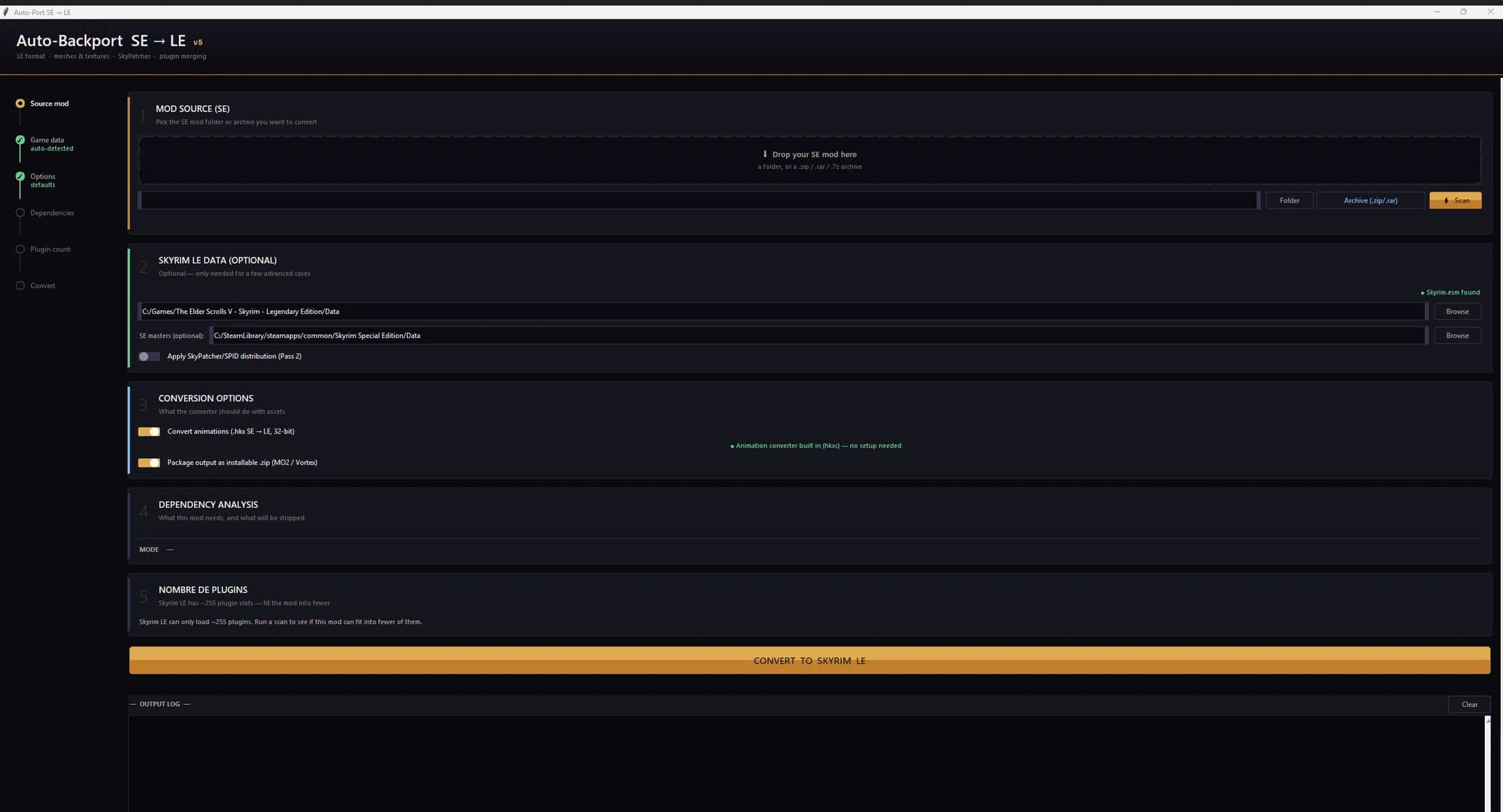
Step rail so you can see where you are, rounded cards, live progress, and plain-English explanations instead of modder jargon.
– NEW — It tells you WHY
Every plugin that cannot be merged is listed with a readable reason — “A script in this mod looks this plugin up by file name” — not a silent skip.
AREA-LOADING CRASHES — FIXED
A converted mod that loads fine in the menu can still crash the moment you walk into its area. Several separate causes were tracked down with real crash logs and fixed at the root. Every one of them is generic — it applies to any mod carrying the same kind of data.
– Particle systems. Fire, smoke and magic effects use a block whose binary layout differs between the two editions — a fact this tool had wrongly assumed away. Converting them corrupted the reading of the whole file and crashed while the cell loaded. Now detected and handled safely.
– A single mesh left in SE format could crash an entire area load — not because it failed to display, but because the engine misread it and lost track of the rest of the file. Those cases are now converted instead of being skipped.
– Flattened terrain LOD. Distant terrain lost its internal structure during conversion, and the engine’s LOD loader does not tolerate that. Fixed, with every LOD shape restored.
– Textures without mipmaps (“crashed while reading binary data stream”). Vanilla LE practically never ships one; SE mods commonly have a quarter of them. The missing chain is generated while keeping the original image byte-for-byte, so there is no quality loss.
– Empty and malformed LOD chunks are removed — vanilla never ships them, and the engine crashes on them rather than ignoring them.
These fixes required no action on your side: they apply automatically to every conversion.
MAIN FEATURES
– Merging you can trust
– The rule this build is built on: a merge is only ever offered when it requires no judgement call.
– No conflicts, ever. If two plugins edit the same thing differently, they are never merged together — they are kept separate and shown to you.
– Nothing is guessed. Plugins that other things reference by file name (scripts using GetModByName, SkyPatcher/SPID/KID .ini files) are excluded — in LE there is no MergeMapper to repair them.
– Navmeshes stay intact. A plugin carrying navmeshes becomes the main file of its group and keeps all of its identifiers untouched.
– Abort over risk. Nothing is written to disk until the merged plugin passes every validation. If anything is off, the merge is abandoned and your files are left exactly as they were.
– Tested at scale, on real mods
Measured across 282 real multi-plugin mods (2 178 plugins) from an actual modded install:
– 901 load order slots freed
– 246 merges completed, 0 corrupted output
– JK’s Interiors Patch Collection: 192 plugins → 17
– JK’s Skyrim + JK’s Interiors Patch: 29 plugins → 1
Still fully self-contained
One .exe. No install, no Python, no CAO, no external converter.
Meshes converted in-house (BSTriShape → NiTriShape, skinning, facegen, LOD).
Textures recompressed from BC7/BC6H/BC4 — formats DirectX 9 cannot read — to BC3/BC1, with mipmaps regenerated.
SE BSA archives unpacked and repacked into an LE-readable archive.
Missing masters stripped cleanly instead of the mod being dropped.
Creation Club resources provided from your own SE install when a mod needs them.
FOMOD installers read and applied correctly, including mods that declare their plugins file by file. 901 load order slots freed
– 246 merges completed, 0 corrupted output
JK’s Interiors Patch Collection: 192 plugins → 17
JK’s Skyrim + JK’s Interiors Patch: 29 plugins → 1
Roughly half of all multi-plugin mods tested benefit from at least one merge.
Nothing is guessed — anywhere
The rule that governs the whole tool, not just merging: when a binary layout cannot be proven, the file is left untouched rather than rewritten on a hunch.
– Mesh and texture conversions are validated against the real vanilla game data before being trusted — the same asset is compared across both editions to prove a format is identical.
– Every converted mesh is re-checked independently afterwards. If anything is off, the whole file is left in its original state rather than shipped half-converted.
– A file the tool cannot handle with certainty is reported to you, not silently mangled.
Still fully self-contained
– One .exe. No install, no Python, no CAO, no external converter.
– Meshes converted in-house (BSTriShape → NiTriShape, skinning, facegen, LOD).
– Textures recompressed from BC7/BC6H/BC4 — formats DirectX 9 cannot read — to BC3/BC1, with mipmaps regenerated.
– SE BSA archives unpacked and repacked into an LE-readable archive.
– Missing masters stripped cleanly instead of the mod being dropped.
– Creation Club resources provided from your own SE install when a mod needs them.
– FOMOD installers read and applied correctly, including mods that declare their plugins file by file.
INSTALLATION INSTRUCTIONS
– Download the archive and unzip it anywhere (Desktop is fine). It is a single .exe — do not install it with a mod manager.
– Run AutoBackport-Enhanced – OnePluginBeta.exe.
– Drop your SE mod — a folder or a .zip / .rar / .7z — onto the window, or use the Folder / Archive buttons.
– Click Scan.
– Look at the Plugin count card. If merges are available, they are ticked by default — untick any you would rather keep separate.
– Click Convert to Skyrim LE.
– Install the result from the Backported_Mods folder with your mod manager, as you would any mod.
Note:
– the Skyrim LE Data and SE masters fields are optional. Leave them empty unless the tool asks for them — vanilla data is already bundled.